![IronSight Emblem_white background-1.png]](https://info.ironsight.app/hs-fs/hubfs/IronSight%20Emblem_white%20background-1.png?width=40&height=40&name=IronSight%20Emblem_white%20background-1.png)
The All Results group helps you find jobs faster by bringing all matching results across all statuses into one unified list, so you don’t have to switch between job groups or run multiple searches.
Steps to Use All Results
- Navigate to the Jobs List in IronSight
- Use filters or a saved view to narrow down your search
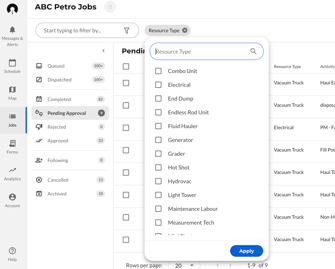
- Select the “All Results” group to view all matching jobs in one list
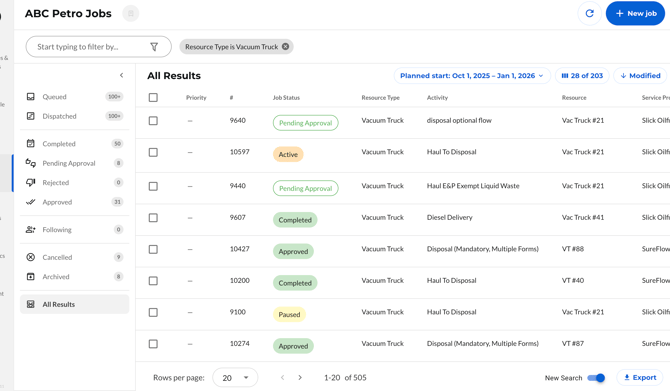
Note: The All Results group is only available once at least one filter has been applied.
4. Apply Date Range
Use the date range option (e.g., Planned Start or Completed) to select a specific time window. You can quickly choose preset ranges (like Today, 1 week, or 1 month) or manually select dates from the calendar.
You can view jobs dating back up to one year, making it easy to review both recent and historical Jobs.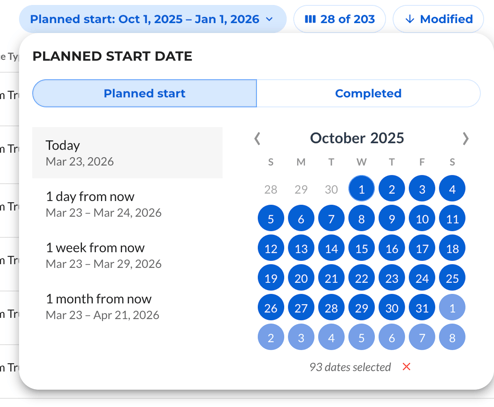
Note: Switching to the Completed date range filters results to completed jobs only, since only completed jobs have a completed date.