---
title: "e-Manifest Haulers Guide: Step-by-Step Transporter Responsibilities"
description: Hauler’s role in the e-Manifest process, including how to confirm waste pickup, complete mandatory forms, and upload disposal tickets.
---
[Skip to content](https://info.ironsight.app/knowledge/e-manifest-haulers-guide#main-content)
[More support](https://info.ironsight.app/knowledge/kb-tickets/new?hsLang=en)
![IronSight Emblem\_white background-1.png\]](https://info.ironsight.app/hs-fs/hubfs/IronSight%20Emblem_white%20background-1.png?width=40&height=40&name=IronSight%20Emblem_white%20background-1.png)
- [Submit Support Ticket](https://info.ironsight.app/knowledge/kb-tickets/new)
- [Download App](https://info.ironsight.app/knowledge/download-apps)
- [Contact Us](https://www.ironsight.app/contact)
Open main navigation
Close main navigation
- [Submit Support Ticket](https://info.ironsight.app/knowledge/kb-tickets/new)
- [Download App](https://info.ironsight.app/knowledge/download-apps)
- [Contact Us](https://www.ironsight.app/contact)
- [More support](https://info.ironsight.app/knowledge/kb-tickets/new)
- [Download Apps](https://info.ironsight.app/knowledge/download-apps)
[Download Apps](https://info.ironsight.app/knowledge/download-apps?hsLang=en)
Hello! How can we help?
- There are no suggestions because the search field is empty.
1. [Support Resources](https://info.ironsight.app/knowledge?hsLang=en)
2. [E-Manifest](https://info.ironsight.app/knowledge/e-manifest?hsLang=en)
October 22, 2025
# e-Manifest Haulers Guide: Step-by-Step Transporter Responsibilities
## In the e-Manifest workflow, haulers (Service Provider) take over after the Producer creates a waste-pickup job. The hauler is responsible for collecting the waste, transporting it to the designated facility, confirming pickup via the mandatory “Transporter Waste Pickup Confirmation” form, and uploading disposal tickets to complete the process.
### e-Manifest Part II: Transporter (Hauler) Responsibilities
#### Step 1: Job Assignment from Producer
Once the Energy **producer** creates a job for waste transportation:
1. The job is assigned to a **service provider (hauler)**.
2. The **service provider assigns the job to a driver** responsible for the actual pickup and delivery.
3. The driver can then view the job details (pickup location, waste type, destination and Quantity) in the system.
---
#### Step 2: Complete the “Transporter Waste Pickup Confirmation” Form
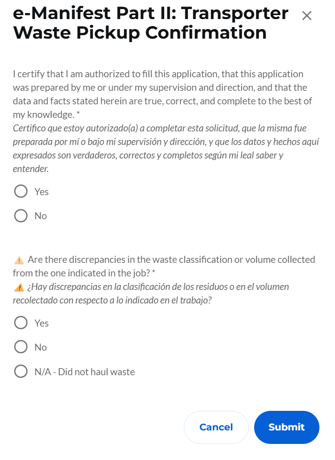
The **e-Manifest Part II: Transporter Waste Pickup Confirmation** is a **mandatory form** that must be completed by the driver assigned to the job.
### Purpose of the Form
This form serves as legal and regulatory proof that:
- The waste has been picked up from the producer.
- The transporter has custody of the waste.
- The transportation process has been initiated according to compliance standards.
### Information Required
The driver will need to provide:
- 1. **Authorization Certification** – The driver must certify that:
- They are authorized to complete the form.
- The information was prepared by them or under their supervision.
- All data provided is true, correct, and complete to the best of their knowledge.
2. **Discrepancy Declaration** – The driver must indicate whether there are any **differences in the waste classification or volume collected** compared to what was indicated in the original job.
Once the form is submitted, the job record updates to reflect that transportation is in progress.
---
#### Step 3: Upload Disposal Tickets
After the waste is delivered to the disposal or receiving facility, the final responsibility of the hauler is to **upload the disposal tickets** received from the facility.
### Disposal Ticket Requirements
- Must include the **date and time of delivery**.
- Should indicate **waste type, quantity, and final destination**.
- Must be **clear and legible**.
Uploading the disposal tickets **completes the hauler’s responsibility** in the e-Manifest workflow. The system will now show the job as **“Completed – Delivered”** and notify the relevant parties.
---
#### Summary of Hauler Responsibilities
| Step | Responsibility | Action Required |
| --- | --- | --- |
| 1. Job Assignment | Accept the job from the producer. | Review job details. |
| 2. Waste Pickup | Complete the **Transporter Waste Pickup Confirmation** form. | Fill and submit the mandatory form. |
| 3. Disposal | Upload **disposal tickets** from the receiving facility. | Attach documents to the job record. |
---
#### Best Practices
- **Submit the pickup confirmation promptly** to avoid compliance delays.
- **Double-check disposal tickets** before uploading to ensure accuracy.
- **Communicate with the producer** if there are any unexpected delays or issues during transport.
- [IronSight for Field Workers](https://info.ironsight.app/knowledge/ironsight-for-field-workers?hsLang=en#main-content)
- [Completing Jobs](https://info.ironsight.app/knowledge/ironsight-for-field-workers?hsLang=en#completing-jobs)
- [Requesting Jobs](https://info.ironsight.app/knowledge/ironsight-for-field-workers?hsLang=en#requesting-jobs)
- [Completing Forms](https://info.ironsight.app/knowledge/ironsight-for-field-workers?hsLang=en#completing-forms)
- [IronSight for Coordinators](https://info.ironsight.app/knowledge/ironsight-for-coordinators?hsLang=en#main-content)
- [Working with Jobs](https://info.ironsight.app/knowledge/ironsight-for-coordinators?hsLang=en#working-with-jobs)
- [Dispatching/Coordinating](https://info.ironsight.app/knowledge/ironsight-for-coordinators?hsLang=en#dispatching-coordinating)
- [Working with Forms](https://info.ironsight.app/knowledge/ironsight-for-coordinators?hsLang=en#working-with-forms)
- [IronSight for Admins](https://info.ironsight.app/knowledge/ironsight-for-admins?hsLang=en#main-content)
- [Rate Agreements](https://info.ironsight.app/knowledge/ironsight-for-admins?hsLang=en#rate-agreements)
- [Locations](https://info.ironsight.app/knowledge/ironsight-for-admins?hsLang=en#locations)
- [Custom Fields](https://info.ironsight.app/knowledge/ironsight-for-admins?hsLang=en#custom-fields)
- [IronSight for Service Providers](https://info.ironsight.app/knowledge/ironsight-for-service-providers?hsLang=en#main-content)
- [Guest Requester](https://info.ironsight.app/knowledge/ironsight-for-service-providers?hsLang=en#guest-requester)
- [SP Admins](https://info.ironsight.app/knowledge/ironsight-for-service-providers?hsLang=en#sp-admins)
- [E-Manifest](https://info.ironsight.app/knowledge/e-manifest?hsLang=en#main-content)
- [Receiver](https://info.ironsight.app/knowledge/e-manifest?hsLang=en#receiver)
- [FAQs](https://info.ironsight.app/knowledge/faqs?hsLang=en#main-content)
- [Login FAQs](https://info.ironsight.app/knowledge/faqs?hsLang=en#login-faqs)
- [Mobile FAQ](https://info.ironsight.app/knowledge/faqs?hsLang=en#mobile-faq)
- [User Guides](https://info.ironsight.app/knowledge/user-guides?hsLang=en)
- [Release Notes](https://info.ironsight.app/knowledge/release-notes?hsLang=en#main-content)
- [Mobile Release Notes](https://info.ironsight.app/knowledge/release-notes?hsLang=en#mobile-release-notes)
- [Web Release Notes](https://info.ironsight.app/knowledge/release-notes?hsLang=en#web-release-notes)
- [Videos y Fichas de Instrucciones](https://info.ironsight.app/knowledge/videos-y-fichas-de-instrucciones?hsLang=en#main-content)
- [General](https://info.ironsight.app/knowledge/videos-y-fichas-de-instrucciones?hsLang=en#general)
- [Solicitar, Ejecutar, y Aprobar Requerimientos](https://info.ironsight.app/knowledge/videos-y-fichas-de-instrucciones?hsLang=en#solicitar-ejecutar-y-aprobar-requerimientos)
- [Coordinar y Asignar](https://info.ironsight.app/knowledge/videos-y-fichas-de-instrucciones?hsLang=en#coordinar-y-asignar)
- [Administrar los datos de la cuenta](https://info.ironsight.app/knowledge/videos-y-fichas-de-instrucciones?hsLang=en#administrar-los-datos-de-la-cuenta)
- [Current and Known Issues](https://info.ironsight.app/knowledge/current-and-known-issues?hsLang=en#main-content)
- [Resolved Issues](https://info.ironsight.app/knowledge/current-and-known-issues?hsLang=en#resolved-issues)
- [Download Apps](https://info.ironsight.app/knowledge/download-apps?hsLang=en)
- [General How To for all IronSight Users](https://info.ironsight.app/knowledge/general-how-to-for-all-ironsight-users?hsLang=en)
- [Integration](https://info.ironsight.app/knowledge/integration?hsLang=en)
- [Job Search](https://info.ironsight.app/knowledge/job-search?hsLang=en)
- [Submit Support Ticket](https://info.ironsight.app/knowledge/kb-tickets/new)
- [Download App](https://info.ironsight.app/knowledge/download-apps)
- [Contact Us](https://www.ironsight.app/contact)
[](https://www.ironsight.app)
[mailto:email@email.com](mailto:email@email.com)
Copyright © 2025, IronSight