---
title: How to set up an E-manifest Coordinator?
description: How to set up a user as an e-manifest coordinator
---
[Skip to content](https://info.ironsight.app/knowledge/how-to-add-an-e-manifest-coordinator#main-content)
[More support](https://info.ironsight.app/knowledge/kb-tickets/new?hsLang=en)
![IronSight Emblem\_white background-1.png\]](https://info.ironsight.app/hs-fs/hubfs/IronSight%20Emblem_white%20background-1.png?width=40&height=40&name=IronSight%20Emblem_white%20background-1.png)
- [Submit Support Ticket](https://info.ironsight.app/knowledge/kb-tickets/new)
- [Download App](https://info.ironsight.app/knowledge/download-apps)
- [Contact Us](https://www.ironsight.app/contact)
Open main navigation
Close main navigation
- [Submit Support Ticket](https://info.ironsight.app/knowledge/kb-tickets/new)
- [Download App](https://info.ironsight.app/knowledge/download-apps)
- [Contact Us](https://www.ironsight.app/contact)
- [More support](https://info.ironsight.app/knowledge/kb-tickets/new)
- [Download Apps](https://info.ironsight.app/knowledge/download-apps)
[Download Apps](https://info.ironsight.app/knowledge/download-apps?hsLang=en)
Hello! How can we help?
- There are no suggestions because the search field is empty.
1. [Support Resources](https://info.ironsight.app/knowledge?hsLang=en)
2. [E-Manifest](https://info.ironsight.app/knowledge/e-manifest?hsLang=en)
3. [Receiver](https://info.ironsight.app/knowledge/e-manifest?hsLang=en#receiver)
October 14, 2025
# How to set up an E-manifest Coordinator?
Coordinators are users from third-party disposal companies designated to review jobs. When a job is created at a location where they serve as a coordinator, they are automatically added as a follower upon activation, giving them immediate visibility into the process. Here's how you can set up users and locations in your account.
**[Accessing IronSight](https://info.ironsight.app/knowledge/how-to-add-an-e-manifest-coordinator#Accessing-IronSight)
[Setting up users as Coordinators](https://info.ironsight.app/knowledge/how-to-add-an-e-manifest-coordinator#Add-new-users)
[Update and archive users](https://info.ironsight.app/knowledge/how-to-add-an-e-manifest-coordinator#Update-and-archive-users)
[Add new disposal locations](https://info.ironsight.app/knowledge/how-to-add-an-e-manifest-coordinator#locations)
Setting up your Account**
#### System Requirements Desktops/Laptops:
We support Windows and Mac devices with a current version of Google Chrome or Edge with at least 8 GB of RAM.
#### Mobile Devices:
- **Android -** requires an operating system of 6.0 and up.
- **iOS -** requires an operating system of 14.0 or later.
**Note:** Even if your device meets these requirements, we have seen issues with some older device models. We recommend devices that are on current OS versions and are no older than 3 years.
**Accessing IronSight**
**You will receive a welcome email from IronSight with a link to create your password after your user have been created in the system.**
After creating your password, follow the link in the 'welcome' email to access IronSight's web app & log in.
**Adding users**
To manage your users and locations, access the Admin Portal as below:
**Click on Account and select Admin Portal**
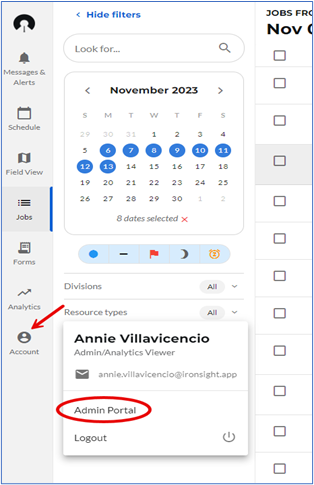
If preferred, you can access the admin portal from your phone at [this link](http://portal.ironsight.app)
**How to manage Users in your Organization**
Users in your organization are the coordinators responsible for reviewing and approving the jobs, please set up all your users as Admins and add an Attribute to ensure the association with the locations they are managing. These attributes will also need to be added as tags to the disposal location they are managing. [Click here to see how to do that.](https://info.ironsight.app/knowledge/how-to-add-an-e-manifest-coordinator#tags)
**Add new users**
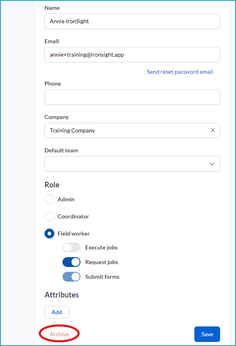
Visit the Users tab and click on **New**.
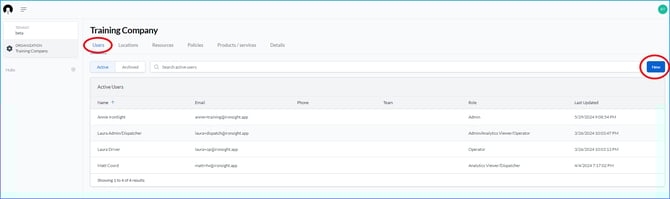
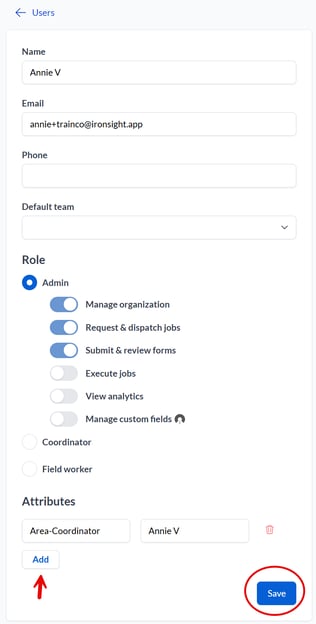
a. Enter a Name
b. Enter an Email address. Important note: This email address will receive an email notification when setting up/updating their password.
c. Enter Phone number. Optional
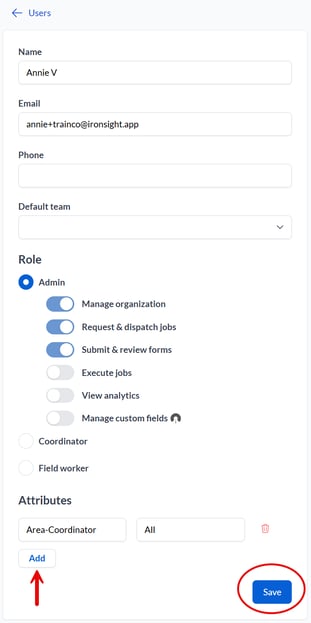
d. Assign the **Admin** Role to the user, the first 3 toggles will turn on automatically.
e. Add the Attribute by clicking on Add, then:
- If you would like the user to see all jobs: , enter "Area-Coordinator" as the newKey and "All" in the field next to it. Then click on Save.
- If you would like the user to only see jobs for certain disposal locations, enter "Area-Coordinator" as the newKey and their name exactly as it appears in the "name" field under their user profile (example "Annie V") in the field next to it. Then click on Save.
f. The user will receive a ‘Welcome to IronSight’ email that will have them set their password.
**Update and archive users**
IronSight also allows you to update information and/or remove the user's access to the platform when needed.
Visit the Users tab and click on the name of the user you would like to update or remove
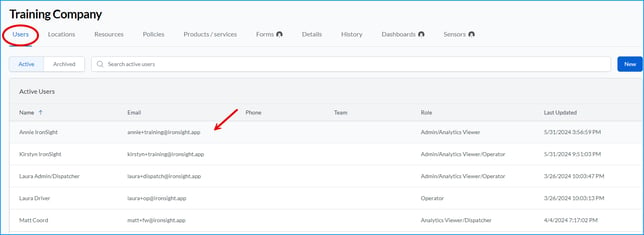
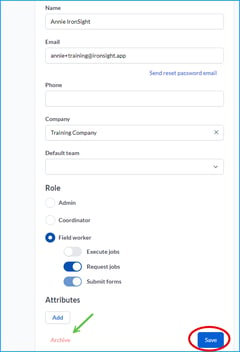
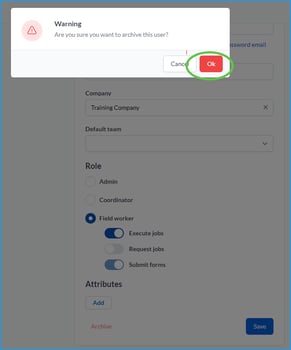
Update the information and click Save, or Click on Archive and then Ok.
If the user needs to be "unarchived". Click on Archived, then click on the name of the user you would like to unarchive
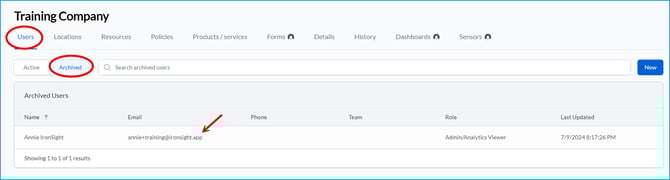 Review information and update if applicable, click unarchive.
**How to manage Locations in your Organization**
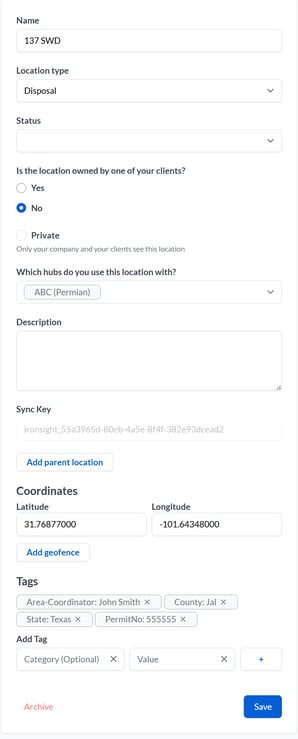
When creating a new location or updating an existing one, please make sure to add all required information and the corresponding "Tags": County, State, PermitNo and Area.
**Add new locations**
Visit the Locations tab and click on **New**.

a. Enter the location name.
b. Specify the location type.
c. Select the current status (optional).
d. Which hubs do you use this location with, this dropdown allows you to select the clients who will have visibility of this location.
e. Provide a description if needed (optional).
f. Input the geographic coordinates—latitude and longitude.
g. Add 4 required "tags":
- Tags categories will be:
- "**County**" and "**State**" where this location is located,
- "**PermitNo**" following the same format written above, capital P and N, no space between words, and
- "**Area-Coordinator**" this tag needs to match the Area Attribute you utilized when creating the user. These Area-Coordinator tags will allow you to associate the locations with your coordinators. Example: if I added the Attribute "Area-Coordinator" and "John Smith" to John Smith, I would add the tag Area-Coordinator: John Smith to all the locations he is responsible for reviewing and approving jobs.
h. Click "Save" to finalize the new location.
[Return to Top](https://info.ironsight.app/knowledge/how-to-add-an-e-manifest-coordinator#top)
- [IronSight for Field Workers](https://info.ironsight.app/knowledge/ironsight-for-field-workers?hsLang=en#main-content)
- [Completing Jobs](https://info.ironsight.app/knowledge/ironsight-for-field-workers?hsLang=en#completing-jobs)
- [Requesting Jobs](https://info.ironsight.app/knowledge/ironsight-for-field-workers?hsLang=en#requesting-jobs)
- [Completing Forms](https://info.ironsight.app/knowledge/ironsight-for-field-workers?hsLang=en#completing-forms)
- [IronSight for Coordinators](https://info.ironsight.app/knowledge/ironsight-for-coordinators?hsLang=en#main-content)
- [Working with Jobs](https://info.ironsight.app/knowledge/ironsight-for-coordinators?hsLang=en#working-with-jobs)
- [Dispatching/Coordinating](https://info.ironsight.app/knowledge/ironsight-for-coordinators?hsLang=en#dispatching-coordinating)
- [Working with Forms](https://info.ironsight.app/knowledge/ironsight-for-coordinators?hsLang=en#working-with-forms)
- [IronSight for Admins](https://info.ironsight.app/knowledge/ironsight-for-admins?hsLang=en#main-content)
- [Rate Agreements](https://info.ironsight.app/knowledge/ironsight-for-admins?hsLang=en#rate-agreements)
- [Locations](https://info.ironsight.app/knowledge/ironsight-for-admins?hsLang=en#locations)
- [Custom Fields](https://info.ironsight.app/knowledge/ironsight-for-admins?hsLang=en#custom-fields)
- [IronSight for Service Providers](https://info.ironsight.app/knowledge/ironsight-for-service-providers?hsLang=en#main-content)
- [Guest Requester](https://info.ironsight.app/knowledge/ironsight-for-service-providers?hsLang=en#guest-requester)
- [SP Admins](https://info.ironsight.app/knowledge/ironsight-for-service-providers?hsLang=en#sp-admins)
- [E-Manifest](https://info.ironsight.app/knowledge/e-manifest?hsLang=en#main-content)
- [Receiver](https://info.ironsight.app/knowledge/e-manifest?hsLang=en#receiver)
- [FAQs](https://info.ironsight.app/knowledge/faqs?hsLang=en#main-content)
- [Login FAQs](https://info.ironsight.app/knowledge/faqs?hsLang=en#login-faqs)
- [Mobile FAQ](https://info.ironsight.app/knowledge/faqs?hsLang=en#mobile-faq)
- [User Guides](https://info.ironsight.app/knowledge/user-guides?hsLang=en)
- [Release Notes](https://info.ironsight.app/knowledge/release-notes?hsLang=en#main-content)
- [Mobile Release Notes](https://info.ironsight.app/knowledge/release-notes?hsLang=en#mobile-release-notes)
- [Web Release Notes](https://info.ironsight.app/knowledge/release-notes?hsLang=en#web-release-notes)
- [Videos y Fichas de Instrucciones](https://info.ironsight.app/knowledge/videos-y-fichas-de-instrucciones?hsLang=en#main-content)
- [General](https://info.ironsight.app/knowledge/videos-y-fichas-de-instrucciones?hsLang=en#general)
- [Solicitar, Ejecutar, y Aprobar Requerimientos](https://info.ironsight.app/knowledge/videos-y-fichas-de-instrucciones?hsLang=en#solicitar-ejecutar-y-aprobar-requerimientos)
- [Coordinar y Asignar](https://info.ironsight.app/knowledge/videos-y-fichas-de-instrucciones?hsLang=en#coordinar-y-asignar)
- [Administrar los datos de la cuenta](https://info.ironsight.app/knowledge/videos-y-fichas-de-instrucciones?hsLang=en#administrar-los-datos-de-la-cuenta)
- [Current and Known Issues](https://info.ironsight.app/knowledge/current-and-known-issues?hsLang=en#main-content)
- [Resolved Issues](https://info.ironsight.app/knowledge/current-and-known-issues?hsLang=en#resolved-issues)
- [Download Apps](https://info.ironsight.app/knowledge/download-apps?hsLang=en)
- [General How To for all IronSight Users](https://info.ironsight.app/knowledge/general-how-to-for-all-ironsight-users?hsLang=en)
- [Integration](https://info.ironsight.app/knowledge/integration?hsLang=en)
- [Job Search](https://info.ironsight.app/knowledge/job-search?hsLang=en)
- [Submit Support Ticket](https://info.ironsight.app/knowledge/kb-tickets/new)
- [Download App](https://info.ironsight.app/knowledge/download-apps)
- [Contact Us](https://www.ironsight.app/contact)
[](https://www.ironsight.app)
[mailto:email@email.com](mailto:email@email.com)
Copyright © 2025, IronSight