![IronSight Emblem_white background-1.png]](https://info.ironsight.app/hs-fs/hubfs/IronSight%20Emblem_white%20background-1.png?width=40&height=40&name=IronSight%20Emblem_white%20background-1.png)
1. What is JSON Export?
JSON Export allows IronSight Admins to export a complete, structured dataset of jobs directly from the Jobs list.
Unlike CSV exports, JSON export preserves nested and relational data, allowing you to analyze information such as:
- Form submissions and responses
- Custom fields and metadata
- Line items
- Approval workflow timestamps
- Field workers and resources
- Stops and inventory movements
This format enables deeper analysis using tools such as:
- Business intelligence tools
- Large Language Models (LLMs) like ChatGPT Claude or Microsoft Copilot
- Data warehouses
- Internal analytics scripts
2. How to use JSON Export
Step 1 — Select export format
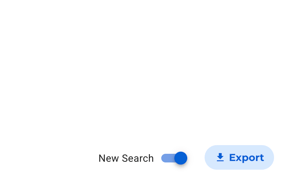
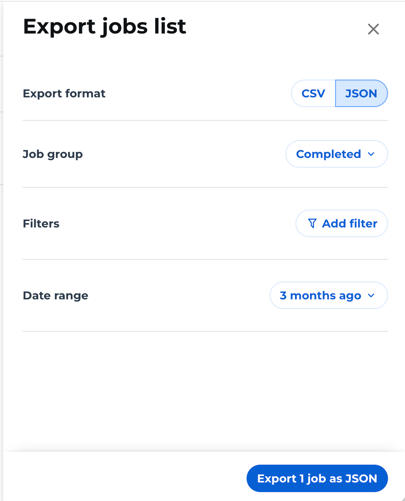
Click Export and choose:
- JSON (recommended for advance analytics and automation)
- CSV (for operational reporting)
Step 1 — Configure your job filters
Configure the Jobs list filters the same way you would while searching for jobs. Your export will show the same jobs, including:
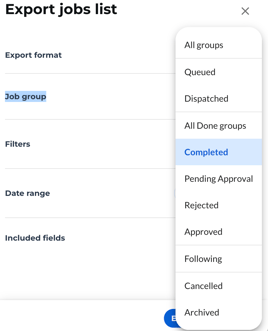
- Job group
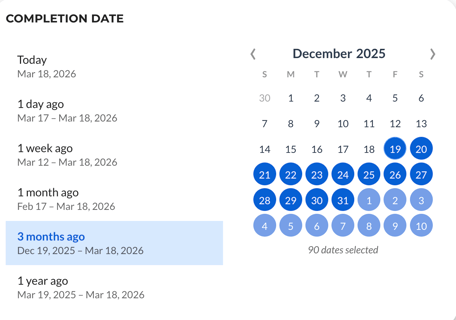
- Date range
- Job filters
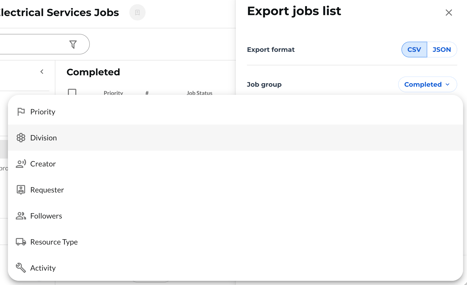
- Sort order
Step 3 — Generate the export
Click on the "Export Jobs Button"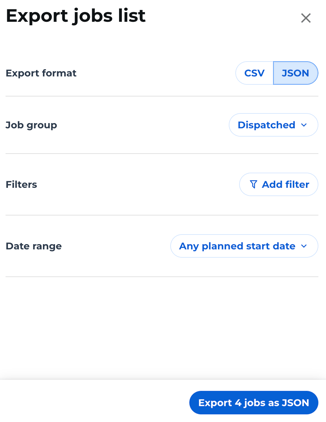
After clicking Export:
- IronSight generates a file containing jobs that match your current filters (up to 20,000 jobs per export for both JSON and CSV).
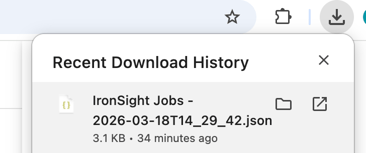
- Export processing usually takes ~10 seconds, but in rare cases, large datasets may take up to 1 minute. While the export is generating, keep this tab open to ensure the download completes.
- The file will automatically download to your computer when ready.
3. Understanding the JSON data structure
Each exported job includes multiple fields describing the job, scheduling, operational data, stops, forms and custom fields.
Job Information
| Field | Description |
| number | Job number |
| status | Current job status |
| approval: status, submitted_time, approved_time, rejection_reason |
Approval state of the job |
| priority | Job priority |
| created_time | When the job was created |
| modified_time | Last time the job was updated |
|
Field |
Description |
|---|---|
|
number |
Job number |
|
status |
Current job status |
|
approval: |
Approval state of the job |
|
priority |
Job priority |
|
created_time |
When the job was created |
|
modified_time |
Last time the job was updated |
Scheduling & Execution
|
Field |
Description |
|---|---|
|
scheduled_start_time |
Planned job start time |
|
scheduled_end_time |
Planned job end time |
|
activated_time |
When the job started |
|
completed_time |
When the job was completed |
|
duration: |
Time actively spent on the job |
|
paused_duration_hrs |
Time the job was paused |
|
distance |
Travel distance recorded for the job |
Operational Context
|
Field |
Description |
|---|---|
|
resource_type |
Type of assigned resource |
|
activity |
Job activity type |
|
division |
Division responsible for the job |
|
hub |
Hub or operational location |
|
assigned_resource |
Assigned vehicle or resource |
|
field_workers |
Workers assigned to the job |
Stops & Field Operations
|
Field |
Description |
|---|---|
|
stops: |
Actual stops completed during the job. Includes type & location of a job, requested inventory, date and inventory receipts |
Forms & Custom Data
|
Field |
Description |
|---|---|
|
forms |
Forms submitted during the job Adhoc forms that only Service Providers have access to |
|
custom_data |
Custom fields or additional job metadata |
4. Prompts you can use to analyze JSON Export data
You can upload your JSON export to an LLM tool (such as ChatGPT, Claude, or Microsoft Copilot), write a simple prompt, and instantly generate insights or key KPIs from your job data.
Below are example prompts to help you get started.
Operational performance analysis
Analyze this IronSight jobs dataset and calculate:
1. Average job duration
2. Average delay between scheduled_start_time and activated_time
3. Top 5 resources completing the most jobs
4. Jobs that exceeded 4 hours of active_duration_hrs
Approval workflow analysis
Using the fields submitted_for_approval_time and approval_time:
1. Calculate average approval time
2. Identify the longest approval delays
3. Show which divisions have the slowest approval cycles
Resource productivity
From this dataset:
1. Calculate jobs completed per resource
2. Identify resources with the highest average completion time
3. Rank resources by total completed volume
SLA compliance analysis
Analyze completion time and response time:
1. Calculate the time between created_time and activated_time
2. Identify jobs that exceeded a 2 hours response time
3. Identify trends by activity or division
Form and compliance analysis
Analyze form submission data:
1. List all forms submitted for completed jobs
2. Identify jobs missing required forms
3. Summarize key form responses
Advanced analytics prompt
Act as a data analyst. Using this IronSight job dataset:
- identify operational bottlenecks
- calculate performance metrics
- recommend improvements to scheduling, approvals, or resource allocation
Tips
For best results, ask the LLM to:
- Treat each JSON object as a job record
- Use timestamps to calculate durations
- Aggregate results by resource, division, or activity
⚠️ Important
Insights generated by AI tools may not always be accurate. We recommend reviewing the results and confirming them with the underlying data before making operational or business decisions.